
About
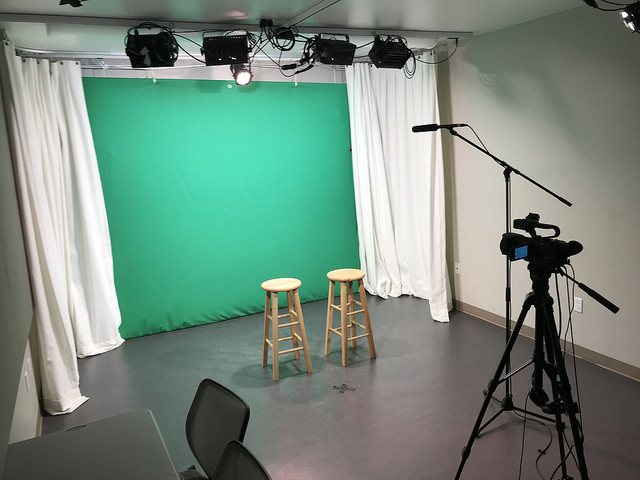
You supply the content, we supply the gear! Shoot your project with a digital HD camera in our Video Production Studio.
Getting Started
Making a Reservation
- Available time slots: 60, 90, or 120-minute reservations
- Maximum occupancy: Eight people
-
Reservation limits:
- Patrons may make one reservation per day.
- Patrons may make a reservation on the same day or up to one week in advance of the desired time.
- Reservations are released after 15 minutes of the scheduled start time if the user has not arrived.
- Patrons will be asked to exit the studio 10 minutes prior to closing time.
- Reserve a studio in Level Up at the Downtown Library or reserve your space online with your library card.
What’s Available
Camera Setups
JVC 4K Ultra HD Camera
Designed with startlingly crisp 4K optics and extensive manual controls, this Ultra HD camcorder perfectly meets your needs from beginner to professional filmmaker.
Overview
An overview of the JVC 4K Ultra HD camera.
Instructions (PDF)
Instruction Manual from JVC.
- IKAN teleprompter
Lights & Green Screen
LED studio lights with controller board
A simple two-scene preset console that allows you to raise or lower studio lights with easy-to-use faders.
Instructions (PDF)
Smartfade 1248 User Manual.
- IKAN professional LED studio lights
Studio Sound
Audio-Technica AT897 Condenser Microphone
Designed for film, video, professionals, this lightweight boom mic is ideal for pointing directly at your action.
Overview
An overview of the AT897.
- Audio-Technica lavlier microphones
- Rode boom pole
Don’t see what you need? Visit our Digital Creativity Workstations information page for instructions, tutorials, and more.
Mobile Video Production Kits
Memory Preservation Station
Your memories, keepsakes, and family stories are priceless. Transform your old photos, letters, and videos into digital files at Level Up's Memory Preservation Station! Housed in the Level Up Video Production Studio, the Memory Preservation Station makes sharing and protecting your memories easy. Learn more.